GrowERP Unveils MCP ServerGrowERP Unveils MCP Server: Powering the Future of AI-Driven Business Operations We’ve completed a proof of concept for implementing a GrowERP Model Context Protocol (MCP) server, built as a Moqui backend component . At this stage, only the basics are implemented, but this groundwork sets the stage for fully integrating AI to transform GrowERP into a true company management AI assistant for small businesses. This new component acts as a sophisticated bridge, connecting AI agents and modern development tools directly to the core of the GrowERP and Moqui backend. How It Works Implemented as a native Moqui component, the MCP Server exposes GrowERP’s extensive business capabilities through a standardized and secure protocol. External systems—especially AI agents—can interact with business data such as companies, products, orders, and financial documents in a structured way. Agents can not only query data but also perform complex business operations like creating invoices from paper documents or managing inventory, all through a secure, high-performance API. Immediate Benefits and Future Vision- Accelerated AI Integration: A clean, well-documented, and standardized interface makes it far easier for developers to build and connect AI-powered tools that can read, write, and understand business data in real time.
- Enhanced Automation: Repetitive tasks and complex workflows—from order processing to financial reporting—can be automated with intelligent agents working directly with ERP data, reducing manual effort and minimizing errors.
- Deeper Insights: By giving AI tools direct access to business operations, the MCP Server enables advanced analytics, predictive insights, and intelligent recommendations, helping businesses make smarter, data-driven decisions.
The launch of the MCP Server is a foundational step toward a more intelligent, responsive, and automated business environment. It transforms GrowERP from a system of record into a dynamic platform ready for the next generation of AI-driven applications. We’re excited to see the innovative solutions our community will build with this powerful capability. Try It Now with Any AI Model! While the following example uses the Gemini CLI, the MCP Server will work with any AI model that supports MCP. - Create a new directory, and inside it create a
.gemini folder with a file named settings.json containing the required configuration.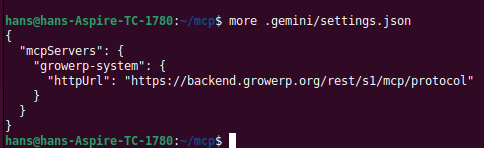
- In the
mcp directory, start Gemini after completing the installation.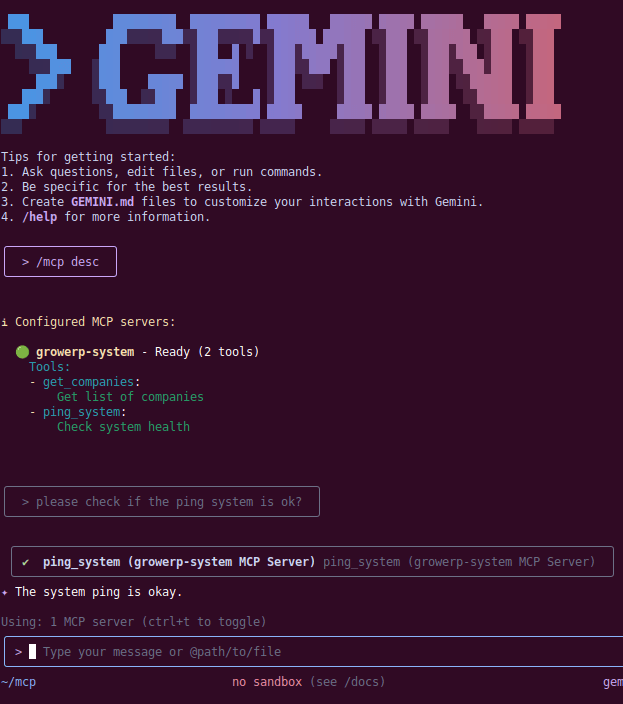
- Run the test by asking: check if the ping system is ok?
- If everything is set up correctly, you should see the response: “The system ping is okay.”
What is next? Over the next few weeks, we’ll extend MCP capabilities by adding authorization and other security features and add integrations with automation systems and invoice scanning tools. |