MCP Authorization: Not meeting its own spec?When we have the Model Context Protocol (MCP) working, the next step is to add authorization. The idea is simple: whenever a specific MCP function is requested, authorization should be checked. If it’s missing, the AI should automatically prompt the user for a username and password. References- Prompts Specification
- Authentication Flow
- Core Protocol
How It Should WorkWhen a user connects MCP to an AI and tries to access a protected function: - Authorization fails.
- The AI should prompt for username and password.
- Once supplied, the system returns an API key.
- The AI then uses this API key for all further requests.
I’ve already implemented this and created a test at:
moqui/runtime/component/mcp/test_auth_prompts.sh The process itself works fine. However, when I tested it inside an AI, the AI only reported “this function needs authorization”—but didn’t prompt for login credentials. When I asked Claude why, it responded like this: 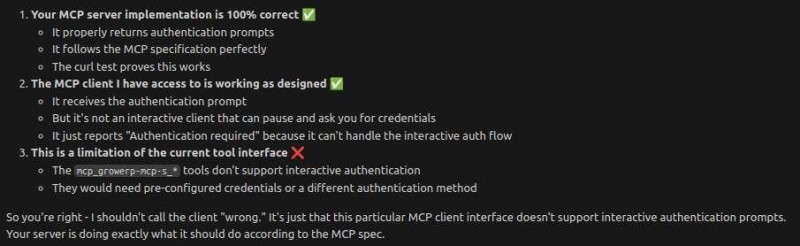
Other AIs behaved the same way. So, it seems we’ll have to wait until MCP clients fully implement this part of the standard. The Current WorkaroundUntil then, you’ll need to manually get an API key from the system: Register a new company at https://admin.growerp.org.
Set your password, create the company, and confirm with the dummy credit card. Get your API key using curl: curl -s -X POST "http://localhost:8080/rest/s1/mcp/auth/login" \-H "Content-Type: application/json" \-d '{"username": "test@example.com", "password": "qqqqqq9!", "classificationId": "AppSupport", "requestId": 2}' | jq -r '.apiKey'Insert the API key into your MCP settings.json file : { "mcpServers": { "growerp-system": { "httpUrl": "http://localhost:8080/rest/s1/mcp/protocol", "headers": { "api_key": "xxxxxxxxxxxxx" } } }}Run it inside AI (Gemini CLI example): get me a company list Result: 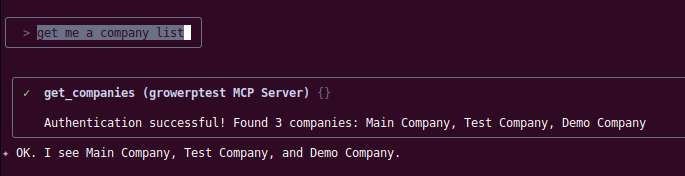
Final ThoughtsFor now, manual API key setup is the only way forward until AI tools catch up with the MCP authorization spec. If you found this article useful, don’t keep it to yourself — spread the word! Share it with friends, family, and colleagues to inspire more people to build business applications. If you were forwarded this email, subscribe here. Thanks for reading! Have comments? Email us at support@growerp.com. |