Hi , It's almost 🦃Thanksgiving. What are your 📅plans? What types of activities are you doing with students to get them to show their 🤗gratitude to others. ☑️Check out this FigJam Copy of Gratitude Activity. When you 🖊️sign in let me know your thoughts and ideas.
🎟 The passcode is winteriscoming but you may still need hialice for some premium addons. PLEASE SIGN IN! I respond ☀️ What Is Up This Week-
🖊️SIGN IN with the passcode winteriscoming
-
📅 Be added to the events calendar for the week. (do this every week!)
- 🔺 Premium Add-on: alicekeeler.com/reusegc
4.💧 🆕Drip Workshop-One Lesson Per Week (online course) Part 3 Keyboard Shortcuts 5..☑️Check alicekeelermembership.com with passcode winteriscoming for resources & events. 6.⏺️ Webinar Recording with Alice: Reading Passages and Google Forms Side by Side Presentation 7.⏺️ Webinar Recording with Alice: Screencastify: Changing Sharing Permissions 8.✅ Check out: Copy of Class Gratitude Activity 🖥️Premium Events🟣
🏢Office Hours with Marcia MENTORS: Monday November 20th 10-10:30am PST Join with Google Meet
 ☑️Insert YouTube 🎞️Video into Google Slides ☑️Insert YouTube 🎞️Video into Google Slides
👉 Use the Insert menu in Google Slides to add a ⏺️YouTube video. 🟣The format options default to ▶️play on 🖱️click, change to "Play Automatically." 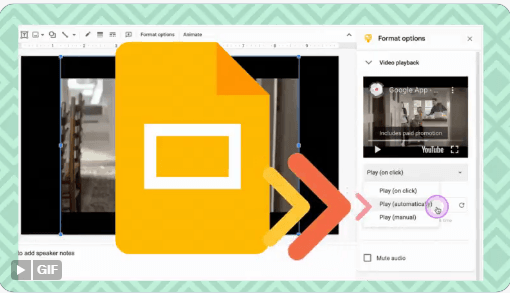
 4️⃣ Things to ✔️Check in Google Contacts 4️⃣ Things to ✔️Check in Google Contacts
❓When is the last time you went to 👀contacts.google.com? There have been many new updates. Here are a few things to try out. contacts.google.com

1. 🛑Stop Suggesting Old 📧Emails💠Sometimes when I am typing in someone's name an old email address for them is suggested. It is very annoying, especially when I accidentally email them at an old address. When I see my email suggesting to me email accounts that I know are no longer valid I go to contacts.google.com and either delete them or update the information. 🧿Use the 3 dots menu next to “Edit” to delete the contact. This email will no longer be suggested to you. 
2. Merge and Fix🧰🟣Everyone has a personal email and work email. They do not need to be 2 separate contacts in your address book. Google Contacts will automatically search for duplicates to merge together. 
3. 📧Email a Whole Group🧑🤝🧑🧑🏽🤝🧑🏽🧑🏻🤝🧑🏿🟠Tired of ⌨️typing in the email address of every teacher in the 🧮math department only to forget someone? 🔵 In Google Contacts a “label” is actually a group. 
🟢Once you create a group (label) you can open any contact and use the 3 dots menu to assign a label to the contact. 🟣For example you can see in the image below that I have a “Parents” label. 🟡 Now I can type in “Parents” into the Gmail subject line and it will send the message to everyone in that label. 
4. 🟠Determine What You Last Discussed🗨️🔹When you select a contact in contacts.google.com you will see a box for “Recent interactions.” 🔶Before going to a meeting with the department chair or a parent, see what recent conversations you’ve had to remind yourself what you all messaged last. 
| 