NotebookLM Workshop
Tip: You can add YouTube videos as resources to a NotebookLM to help you to create classroom resources.
I'm going to be adding more modules to my NotebookLM workshop, they keep coming out with new features! If you already signed up for the workshop you'll get the new modules free of charge. (Premium members get free access to the workshop)
Get Unlimited Premium Features
Cancel anytime, become a premium member for exclusive benefits and support. Use the button to save 40% on a monthly membership.My 39th Add-on is Coming! Easy Thumbnail Maker for YouTube
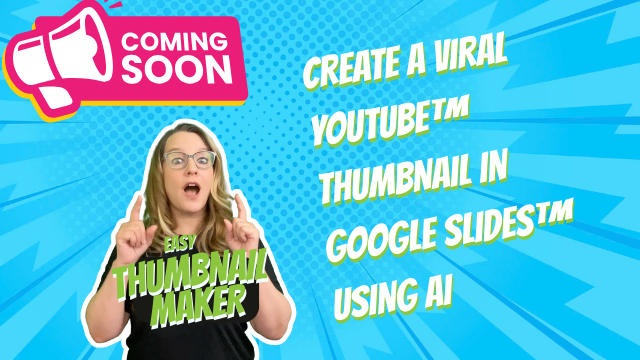
I am excited to share that I have been coding a brand new add-on for Google Slides. This tool is designed to help you create YouTube thumbnails with ease. Why use Google Slides for thumbnails? Because you own it! I saw an AI tool that was 😱$40 a month and of course they own your data. No thanks. When you design the thumbnails in Google Slides, you own the data (As usual, I collect ZERO of your data) and you know how to edit Google Slides so no learning curve!
This add-on allows you to create multiple versions of a thumbnail. You'll paste the link to a YouTube video into the sidebar and choose from a variety of starter styles. You can even drag images onto the active slide to include in the creation.
I have designed it as a safe tool for teachers that collects no data.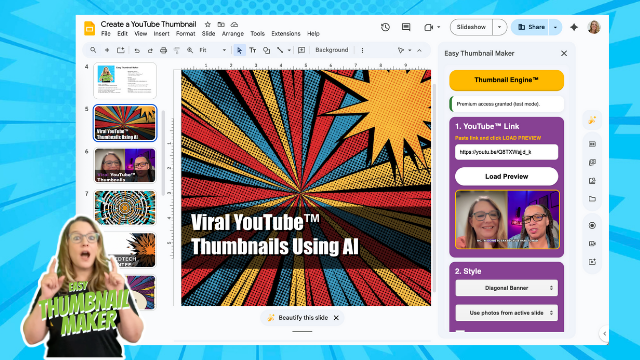
Recent Posts from alicekeeler.com
- 10 YouTube Hacks for Teaching
- Amplify Student Voice and Redefine Classroom Possibilities
- 10 Tips for Creating a Student Centered Classroom
- WOW Split View in Google Chrome
- Count the Colors in Google Sheets
- Using the Teleprompter in Google Vids
- View Your Spreadsheet as a Calendar
- Magically Create Google Slides with Google Gemini
Go Further with YouTube
, I have some tips for you to use YouTube. I recently wrote a blog post expanding on these strategies below and sharing a few more hacks to make YouTube a powerful part of your teaching toolkit.
YouTube: Target Learning with Clips
Sometimes we find a video that is absolutely perfect for our lesson, except it is twenty minutes long and we only need one specific minute to illustrate our point. We want to respect student time and cognitive load by focusing their attention exactly where it matters. YouTube Clips allows you to select a loop of 5 to 60 seconds from a video and share just that portion. This is incredibly helpful for scaffolding complex ideas or providing quick review material without the distraction of the full video.
- Locate the "Clip" button with the scissors icon under the video player.
- Drag the blue slider box to select the specific section you want to share.
- Add a title to your clip that describes the content.
- Click "Share clip" to get a unique link that sends students directly to your loop.
YouTube: Transcripts for Literacy
YouTube is not just for watching. It can be a powerful literacy tool when we utilize the transcript feature. This is an excellent way to support students who need to see the text while they listen, or for research purposes when students need to find a specific quote or fact. By opening the transcript, students can engage in critical thinking by analyzing the text of the speech rather than just passively consuming the visual media.
- Click the "More" button in the description box below the video title.
- Select "Show transcript" from the bottom of the description.
- Use "Control F" (or Command F on a Mac) to search the transcript text for specific keywords.
- Click on any line of text in the transcript to jump the video to that exact moment.
YouTube: Manage Playback with Shortcuts
When you are facilitating a lesson or discussion in front of the class, it breaks the flow to have to walk back to your computer and fumble for the mouse to pause the video. Knowing your keyboard shortcuts allows you to manage the media seamlessly. This keeps the focus on the classroom conversation and student questions rather than the technology. It is a small change that makes your delivery much smoother.
- Press K or the Spacebar to Pause and Play.
- Press J to rewind 10 seconds to review a point.
- Press L to fast forward 10 seconds to skip ahead.
- Press M to mute the audio quickly.
- Press F to toggle full screen mode.
YouTube: Curate with Playlists
We want to move students into the "Explore" phase of the 5 E's lesson plan model effectively. While you likely already know what a playlist is, using them strategically for a unit can change how students engage. Instead of sharing single links day by day, create a unit playlist. This allows students to navigate through resources at their own pace, re-watch videos for clarity, and take ownership of their learning path before direct instruction begins.
- Click the "Save" button (the icon with three horizontal lines and a plus sign) under a video.
- Select "Create new playlist" and give it a clear, relevant title for your unit.
- Set the privacy to "Unlisted" if you only want your students with the link to see it.
- Go to your Library on the left sidebar to find your playlist and click the "Share" arrow to get the playlist link.
YouTube: Students as Curators
Let's increase the rigor by asking students to be the ones who find the content. Instead of the teacher always providing the resources, ask students to find a video that supports a claim or explains a concept. This shifts the dynamic from passive consumption to active collaboration. It requires them to evaluate content for quality and relevance, which is a critical digital citizenship skill.
- Create a collaborative Google Slide deck or Spreadsheet.
- Task students with finding a video that demonstrates the concept of the day.
- Have students "Clip" the specific evidence and paste the link into the collaborative document.
- Ask students to comment on each other's finds to validate the information.
More YouTube Resources from the Blog
🔧 Available AliceKeeler Add-ons
AliceKeeler Add-ons do NOT collect user data. No PII. Upgrade to the unlimited pass for premium features.
| Add-on Name | Link |
|---|---|
| Educator AI Assistant | Access add-on |
| Make My MC Quiz | Access add-on |
| AliceTasks AI Work Sessions | Access add-on |
| Doc to Slides | Access add-on |
| Document Outline | Access add-on |
| Seating Chart Slides | Access add-on |
| Tiny Doc Remove Blank Lines | Access add-on |
| Audience Participator | Access add-on |
| Form Printer | Access add-on |
| Fresh Form Tab | Access add-on |
| Missing From | Access add-on |
| Notice Wonder Form | Access add-on |
| Popsicle Sticks Form | Access add-on |
| Quiz Helper | Access add-on |
| AliceKeeler Select the Cells | Access add-on |
| Bingo | Access add-on |
| CalAdd | Access add-on |
| DelCal | Access add-on |
| GC Rubric | Access add-on |
| HappyGrader for Sheets™ | Access add-on |
| Make a Test | Access add-on |
| Pixel Art | Access add-on |
| Quick Crop | Access add-on |
| Ridiculously Basic Email Merge | Access add-on |
| Scheduler 🗓️ | Access add-on |
| Sheet Streamer | Access add-on |
| sheetPusher | Access add-on |
| TemplateTab | Access add-on |
| toTabs | Access add-on |
| Add a Date | Access add-on |
| Clear Rectangle | Access add-on |
| Daily Agenda Slides | Access add-on |
| Dice Slides 🎲 | Access add-on |
| Hyperlink Slides Choice Board | Access add-on |
| Randomize Slides | Access add-on |
| Slides Timer Add-on | Access add-on |
| Slides to Spanish+ | Access add-on |
| Speaker Notes | Access add-on |