Hi , Happy 🆕New Year 🥳#2024! It's time for the new 📚semester for most of you, which means starting a new Google Classroom is a good plan. ✅Check out this page specifically for Google Classroom. When you 🖊️sign in let me know what's going well and what challenges you have. 🎟 The passcode is winteriscoming PLEASE SIGN IN! I respond ☀️ What Is Up This Week-
🖊️SIGN IN with the passcode winteriscoming
-
📅 Be added to the events calendar for the week. (do this every week!)
- 🔺 Premium Add-on: Reuse GC for Google Classroom Users
Reuse GC Video 4.💧 🆕Drip Workshop-One Lesson Per Week (online course) Go Slow for the Holidays #2 5..☑️Check alicekeelermembership.com with passcode winteriscoming for resources & events. 6.⏺️ Webinar Recording with Alice: Google Classroom students submitting work from a Link 7.⏺️ Webinar Recording with Alice: Clean up Google Classroom on my Drive
8.✅ Check out: 32 short Videos to get Started in Google Classroom 🌟Premium Event This Week✴️ One on One with Alice Keeler
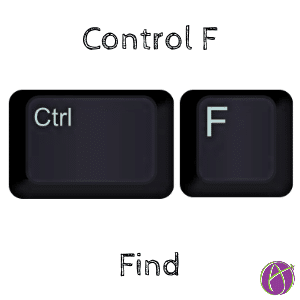
 🔎Control F – Find 🔎Control F – Find
🔎Control F lets you find keywords on a web page or within a document. Command F on a Mac. ⌨️This keyboard shortcut is handy in a grade book to 🦘jump quickly to a student’s name in the roster or spreadsheet.
 10 Features 🌠 of Google Drive 10 Features 🌠 of Google Drive
1. 🟣File storage and syncing📕This might seem be the most obvious feature of Google Drive. However, the ability to ditch the thumb drive is significant. One place for all of your files. Not scattered across multiple devices. This increases your productivity and confidence to not lose files. 2. 🟢Sharing and collaboration🤝📗Really isn’t the best thing about Google Docs the collaboration?! The best features of Google Drive are the ability to share files and collaborate on them. I’ve shared and collaborated on files with friends in China even. The world becomes very small when we use Google Drive to work with others. 📘You can change the sharing permissions on a file in Google Drive by using the toolbar, right clicking on the file, or pressing the period key. 3. 🔵Real-time🕙 document editing✳️Google Drive offers real-time document editing, which means that multiple people can work on the same document at the same time. 🔶This is a great feature for teachers who want to collaborate with their colleagues on lesson plans, assessments, or other class materials. 📒With real-time editing, you can see changes being made in real-time, making it easy to communicate and work together effectively. 4. 🔴Google Docs📃, Sheets, Slides, and Forms🔺Google Drive works with more file types than Google Docs… but why would you want to?! (There are many good reasons to use other file types) Docs, Sheets, Slides, and Forms are great products. If you use docs.new you will quickly create a new Google Doc and of course it is automatically saved to Google Drive. 🔺sheets.new, slides.new, forms.new, sites.new all work as shortcuts to quickly create a new file. 5. 🟡Office 📁file compatibility🏵️Interoperability is a big deal! Even if you are working with someone who uses Microsoft Office you can effectively work together. You can open, edit, and save Microsoft Word, Excel, and PowerPoint files directly in Google Drive. 6. 🟠File📂 version history🖱️Single click on a file and press i for info. This will reveal the activity pane to allow you to see when and by whom the file was edited. 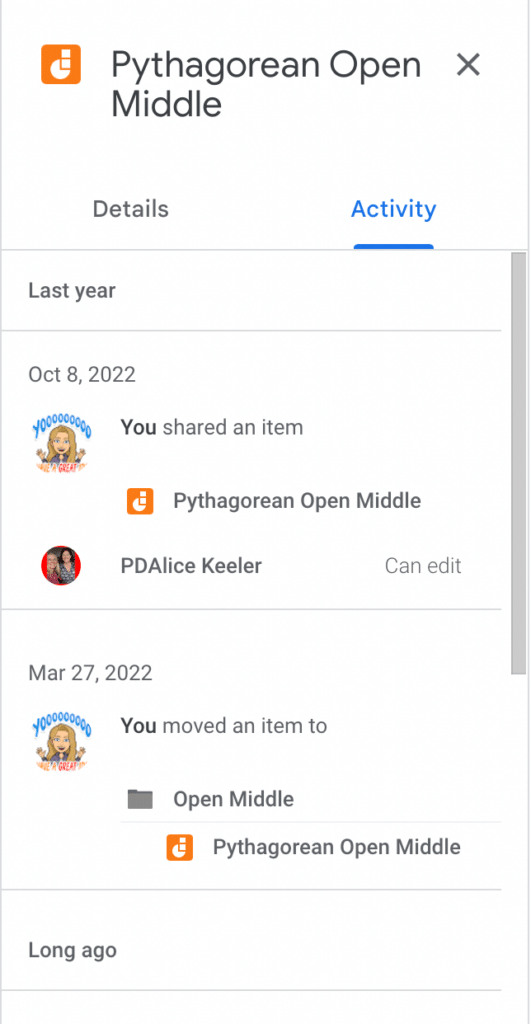
7. 🟣Accessibility from anywhere with an internet connection📗Yesterday I was in 🇵🇪Peru at a school to work with math teachers. They already had their computer connected to the projector. It was easier to just use their computer than try to get a cable to connect mine. Not to mention, how to get on their school wifi. 📓Logging into my Google Drive on the foreign computer was a seamless experience. Ha, except for the Peruvian keyboard is ALMOST the same as the US keyboard, but this is a different issue. So many times there was a reason I needed to use a different computer than my own. Google Drive to the rescue. I have all of my files and I’m good to go. 8. 📱Mobile apps for iOS and Android⭐Not only can I access Google Drive from anywhere I can access the internet I can access on my phone. 👉Install the Google Drive app to find your Google Forms and other files. How many times have I needed to pull up a file when I’m not at my computer? Too many times to count. The Google Drive app is a lifesaver. 9. 🚫Offline access✈️When I am on a plane I do not always have internet access. This doesn’t stop me from creating a new Google Doc to get to work. Go into the settings of Google Drive and set it to allow offline access. 10. 🟢Find👀 Google Sites🧿Google Sites (websites) is a Google Apps file! Go to sites.google.com or make a new site.new. Bop over to Google Drive and you will find your Sites there just as if they were a Google Doc. ☘️This makes it a LOT easier to find your website. Have students create projects and portfolios in Google Sites. When they share the site with you, you can locate them in Drive. A big advantage over other website creation tools. Recent Blog Posts
- January 2, 2024: Official Pixel Art Add-on for Google Sheets
- December 30, 2023: Transforming Classrooms: Teaching with Google
- December 22, 2023: 10 Google Docs Add-ons for Teachers
- December 19, 2023: 10 Hidden FigJam Whiteboard Gems
- December 13, 2023: Multiple Forms to One Google Sheet
- December 13, 2023: Creating Random Google Forms Quiz Versions
- December 12, 2023: Bye Bye Jamboard
- December 9, 2023: 5 Easy Steps for Teaching with Digital Tools
- December 6, 2023: Help Your Students Prepare to Present
- December 3, 2023: How Teachers Can 🛳️ Cruise to Less Stress with Tech
- December 1, 2023: Infographic 7 Basic Steps for a Google Form
| 