Hi , Since, we just celebrated 🛠️Labor Day, I feel like 🏫school has officially begun, even though we started 3 weeks ago. ✏️Teaching students how to log on to Google Classroom and other routines are becoming easier each day. 4️⃣Now, I am focusing on using at least one of the 4C's each day. 🎨Creativity, Collaboration, Critical Thinking and Communication. 🎟 The passcode is hialice but you may still need alpaca for some premium addons.
PLEASE SIGN IN! I respond ☀️ What Is Up This Week-
🖊️SIGN IN with the passcode hialice
-
📅 Be added to the events calendar for the week. (do this every week!)
- 🔺 Premium Add-on:: alicekeeler.com/ReuseGC Reuse Google Classroom Assignments
4.💧 Drip Workshop-One Lesson Per Week (online course) Google Classroom Tips #2 5..☑️Check alicekeelermembership.com with passcode hialice for resources & events. 6.⏺️ Webinar Recording with Alice: Making Google Sites Presentation Slides 7.⏺️ Webinar Recording with Alice: Tech Tool Screencastify 8.✅ Check out: Snag it-Teacher Tool
Implementing A #️⃣Number Talk💬
#️⃣A number talk is STUDENTS doing the thinking. Try to have 🎰POKER face and not give value to one answer over the other. 💹Value different approaches and the thinking over getting the✔️ answer right. 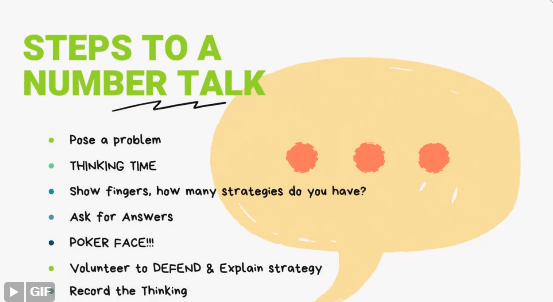
 3️⃣ Ways to Use Google 👀Sites this Semester 3️⃣ Ways to Use Google 👀Sites this Semester
Webinar: 3 Ways to Use Google Sites

☑️Create a Google Site🧑You can create a Google Site at sites.new. You can also find templates for Google Sites at sites.google.com. Since Google Sites save to your Google Drive they are easy to find.
1. What Are We Doing Today🌞Google Sites is multi-media!! This means you can embed images, videos, documents, etc… 🔗When students need to click on a link… they might not. It is better to have the document or image visible without clicking. This is what is great about Google Sites. When you insert a Google Doc it is not a link to the Google Doc but rather the embed of the actual document. Students see the document right in the activity directions. 🎨Create a Page a Day📅Every day create a new page on your class Google Site with “What are we doing today.” EMBED the things students need to review to help them see everything they need for the day all at once. 📹Add videos of yourself giving the directions. I use Screencastify. The videos embed right into the page! 🖱️🖱️Double Click WheelWhen you double click on a Google Sites page you get an insert wheel! Insert text and objects from Google Drive. 2. 🆘Google Sites TutorialsI have a Google Site with pages for different tutorials my students need. Especially for content they would have learned prior to my class and may need a refresher on. Google Sites are great because they are multi-media and can have a variety of engaging elements to help students to understand a concept all on one page! 🔗After creating a tutorial page and publishing the updates, click on the link icon in the Sites toolbar to copy the link to that specific page. ⚠️Share the tutorial page with students as needed. 
3. 🧑🤝🧑Student Collaboration Projects🎬Google Sites is collaborative! This means students can work together on the same Google Sites. ✅Have one student in the group create a new Google Site and then use the share icon in the toolbar to share with group members. 🔗Students can submit the published link to their Google Site or can add the teacher as a collaborator to the site. 
| 