, I hope you've been enjoying the Black History Month content. We often feel the pressure to "pause" our curriculum to teach Black History Month. But what if Black history wasn't a detour? What if it was the vehicle for teaching your core standards? If you've not yet tried NotebookLM, this is a great excuse to get started. I’ve developed a NotebookLM to help you see how NotebookLM might be a helpful tool. Please look at the bottom of this newsletter for a link to a sample notebook you can try for yourself.
As a math teacher I have noticed that history is often missing from our curriculum. So what do we do when the content we are provided doesn't include the topics we wish to integrate? This is where NotebookLM can come in handy. Adding Black History resources to a NotebookLM notebook along with your lesson plans, resources, assessments. Prompt NotebookLM to integrate the Black History resources and update your lesson plan and resources.
Getting Started with NotebookLM
NotebookLM is an AI research assistant from Google. Most AI tools pull information from the entire internet. NotebookLM is different because it is grounded in the sources you choose. You upload your own documents and the AI becomes an expert on that specific content. This makes it a very powerful tool for teachers who want to dive deep into a specific topic without getting lost in generic internet search results.
When you use NotebookLM you can ask questions about your documents and it will give you answers with citations. It can help you summarize complex ideas and find connections that might be hard to see at first glance. It is like having a teaching partner who has read every single source in your library and is ready to help you brainstorm. You can use it to organize your thoughts or generate ideas for new lessons based on the research you have already done.
Steps to move forward:
- Go to the NotebookLM website using the link below.
- Sign in with your Google account.
- Create a new notebook and give it a helpful name.
- Upload your sources such as PDFs or Google Docs or even copied text from a website.
- Use the chat box to ask questions or generate lesson ideas based on your specific sources.
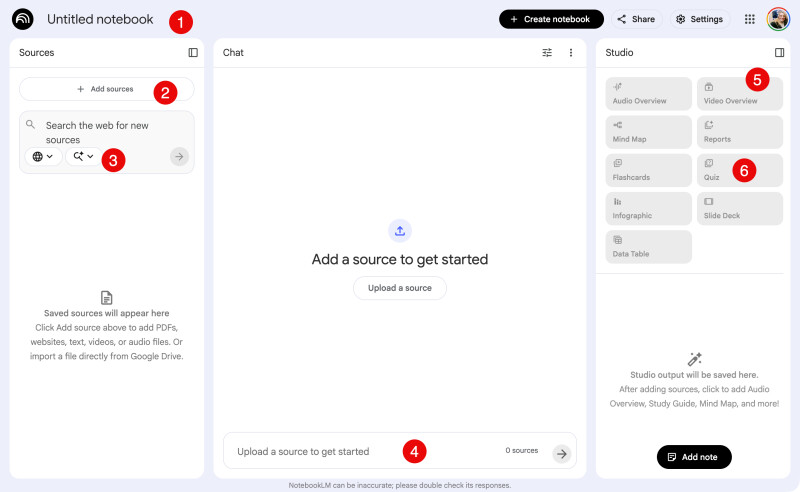
- Name your notebook
- Add sources such your lesson plan template and standards.
- Search for additional resources to add to your notebook. Suggestion, try the deep research to gain resources on how to teach Black History.
- Chat with the notebook. Ask questions about your sources.
- Use the studio to generate a video overview, a quiz, or slides that you can utilize in your classroom.
Tutorial: Create Your Integration Assistant
The real power of NotebookLM is when you combine historical sources with your own teaching materials. You can create a custom notebook that knows exactly how you teach and what your students need to learn. This allows you to generate resources that are perfectly aligned with your style and your standards.
How to build your custom notebook:
- Step 1: Add Historical Content. Upload primary sources such as patent applications, personal letters, or articles about Black innovators and movements. These are the history anchors for your lessons.
- Step 2: Add Your Teaching Materials. Upload your own lesson plan templates, your grade level standards documents, and your current unit outlines. This teaches the AI your specific framework for instruction.
- Step 3: Ask for the Connection. Use the chat to combine these sources. You might say, "Take my lesson plan template and create a new lesson for my current science standard using the research methods from the George Washington Carver article."
By bringing these different documents together in one notebook, you can quickly create activities that feel natural and authentic. The AI will use your own template to ensure the formatting is exactly what you want while pulling from the historical sources to enrich the content.
Try My Notebook
I have already created a notebook for you to try. I loaded it with over 200 topic anchors and pedagogical guides. The goal is to help you find a natural fit for Black history in any subject or grade level. You can use this today to enhance your current plans.
Note: you are chatting with my sources and are not able to generate your own slides or audio overviews since you're accessing my notebook. Create your own notebook so you can try making the studio tools.
Suggested prompts to try in the notebook:
- I am teaching a lesson on [Insert Topic]. Suggest a Black history connection that authentically illustrates this concept.
- What is a primary source from a Black innovator that I can use as an engage hook for my lesson on [Insert Topic].
- Who is a Black strategist who used the logic of [Insert Skill] to solve a problem.
- How can I design a project where students use Google Slides to collaborate on a topic related to [Insert Historical Anchor].
- Give me five essential questions that connect [Insert Standard] to the Black experience in a natural way.
- Help me design a rubric for this lesson where meets standard is the full credit expectation and the focus is on student growth.
- What are some unsung heroes in the field of [Insert Subject] who show positive significance and excellence.
- How can I adapt this specific standard [Insert Standard] to include a Black history connection while following the 5 Es model.
- Create a collaborative task for [Insert Grade Level] that focuses on the innovation of [Insert Black History Anchor].
- Identify three ways the history of [Insert Topic] can be used to promote critical thinking in my current unit.