Hi , Well, it is officially sweater and🧥 jacket weather, and🔥 heated seats if you have them. I've noticed students are starting to fill up the 📚library and other inside spaces. Does your library have activities or a ✂️"Maker Space"? Just curious. When you 🖊️sign in let me know. 💯 I created a NEW Part 3 Keyboard Shortcuts Course please ✔️check it out. One lesson per week is sent to your 📧email. 🎟 The passcode is hialice but you may still need alpaca for some premium addons. PLEASE SIGN IN! I respond ☀️ What Is Up This Week-
🖊️SIGN IN with the passcode hialice
-
📅 Be added to the events calendar for the week. (do this every week!)
- 🔺 Premium Add-on: Make More Folders For Students Add-on
👉👉👉 4.💧 🆕Drip Workshop-One Lesson Per Week (online course) Part 3 Keyboard Shortcuts 5..☑️Check alicekeelermembership.com with passcode hialice for resources & events. 6.⏺️ Webinar Recording with Alice: Choose Your Own Adventure with Google Tools 7.⏺️ Webinar Recording with Alice: Using Agenda Slides Copy of Daily Agenda Slides by Alice Keeler 8.✅ Check out: Is this prime? Game 🖥️Premium Events🟣
🏢Office Hours with Marcia MENTORS: Monday November 6th: 4-4:30PM PST Join with Google Meet
 🌐Google Sheets: Translating 🌎Languages 🌐Google Sheets: Translating 🌎Languages
🟦Google Sheets makes it easy to translate cells; 👍Use the "GOOGLETRANSLATE" function to translate text in your Google Sheets. 
🟩=GOOGLETRANSLATE()🔢The formula =GOOGLETRANSLATE() will convert text in one language in Google Sheets to another language. 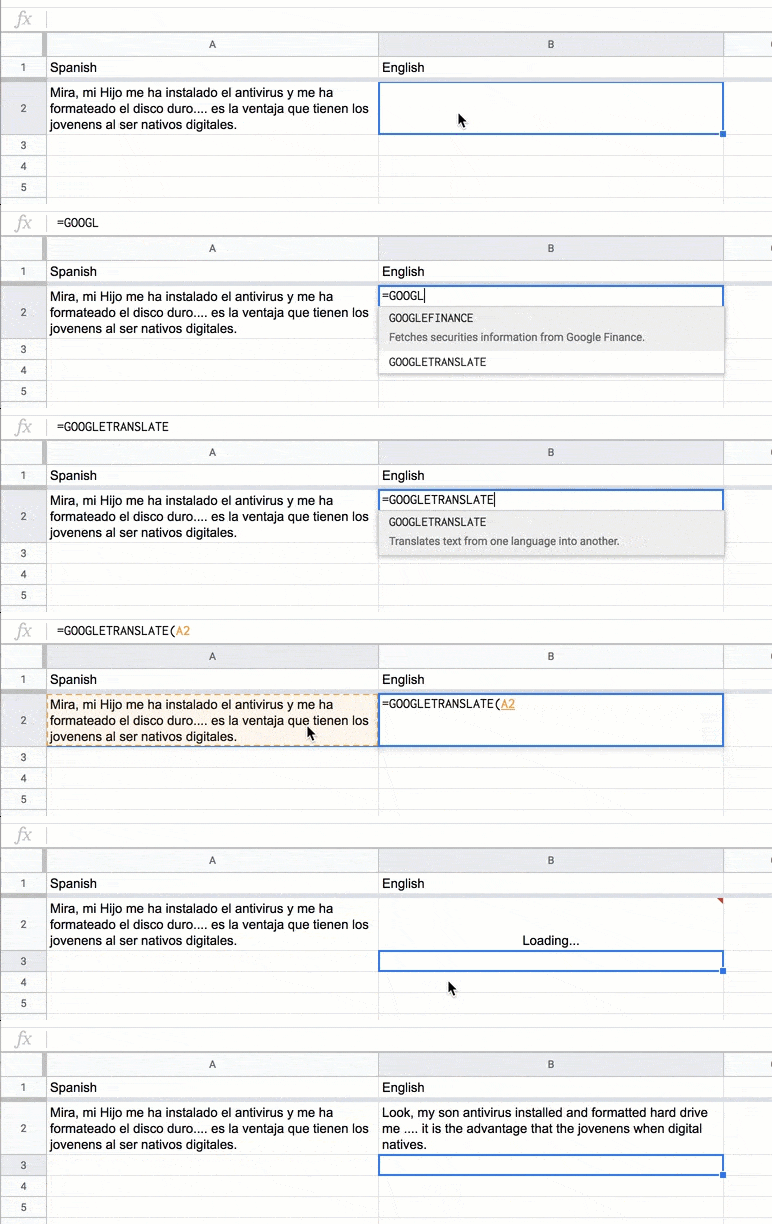
 🆕 Search the Google 📄Doc Menu 🆕 Search the Google 📄Doc Menu
🟨Google has been updating features and design in Google Workspace. Notice in Google Docs that the 🧰toolbar has changed. The first icon is now a 🔎search icon. This new feature to search the menus will speed up⬆️ your workflow. The 🎩trick is to practice using this new feature. 🟧Find FeaturesWhat are you 🤔thinking… 🔎search it. Want to set the 🖨️ margins in your Google Doc… maybe you haven’t done it in awhile and need to click around to find exactly where you adjust the margins. Or perhaps, you do know, but it is several clicks to locate the margin options. 📃There is no menu option specifically titled “margins.” However, simply searching “margins” in the search option quickly points you to “Page setup.” Selecting it, takes you there. ❔Did you know there is a menu option to change your text into Title Case? This is where the first letter of each word is capitalized. The problem is, this option is buried deep in the menu structure. Even knowing that it is available in the Format menu, you might just think it is easier to manually capitalize each word.
🆘Not only is it faster to search for title case using the search icon in the toolbar, you do not have to visit the menu at all. Selecting “Title Case” out of the search options simply applies Title Case. Menu skipped. 
🟥Get in the HabitGet in the habit of using the 👀search icon, especially for things you are proficient at finding in 📄Google Docs. The challenge is to make the search icon muscle memory. So anytime you think you need a feature in Google Docs you do not ⏳waste time looking for the feature, but instead, just ask for it. 🔎Search the Google Docs Menus🕵️The icon to search the Google Docs Menus is subtle. It is not just a help feature, but a speed wizard.
| 