Hi , I have been making some updates to TemplateTab. I would love your feedback. But first... sign in! I want to hear from you!!SIGN IN NOW: Use passcode hotsummer TemplateTab - for Google SheetsTemplateTab is my first Add-on! It is available in the Google Workspace Marketplace. As a premium member you have free access to the premium features. From the Extensions menu choose "Premium Membership" under TemplateTab and "Enter passcode" hotsummer 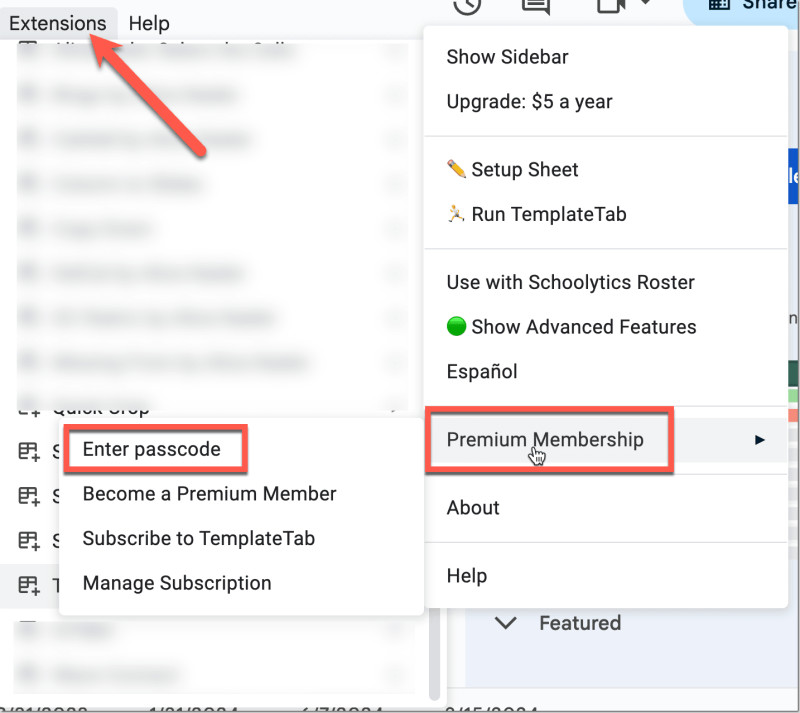
Premium Feature: Export Sheets to Individual SpreadsheetsOnce you have installed TemplateTab, open ANY spreadsheet. Show the advanced features sidebar to select "Export Tabs." TemplateTab will separate out your spreadsheet into individual sheets. TRY IT! It's fun! 
Upcoming EventsFind the upcoming events on alicekeelermembership.com and use the passcode hotsummer to enter. Fill Out Each Week: Be Added to Upcoming Events Webinar: Using Diffit - It's Easy!Saturday Google Meet starts 7/20/2024, 12:10:00 PM Pacific Daylight TimeDiffit is an AI tool that has a super clean and intuitive interface! Let me show how it works and how it aligns with the values of Teacher Tech! Quickly creates lesson builder elements that are actually helpful! Get Diffit Pro for FREE for the rest of 2024: https://app.diffit.me/redeem?code=KEELER#topic Member suggested by Alice Keeler on Sat Jul 20 2024 13:40:00 GMT-0600 (Central Standard Time)Google Meet Link: https://meet.google.com/euh-ukvt-qryOffice Hours: With AliceMonday Google Meet starts 7/22/2024, 2:00:00 PM Pacific Daylight TimeHang out with Alice and ask her anything! Member suggested by Alice Keeler on Mon Jul 22 2024 15:30:00 GMT-0600 (Central Standard Time)Google Meet Link: https://meet.google.com/wuu-rcgy-dgdWebinar: Getting Started with FigJamTuesday Google Meet starts 7/23/2024, 12:10:00 PM Pacific Daylight TimeFigJam is your replacement for Google Jamboard. In this interactive webinar Alice will help you with some basics for using a FigJam with your students. Member suggested by Alice Keeler on Mon Jul 15 2024 13:40:00 GMT-0600 (Central Standard Time)Google Meet Link: https://meet.google.com/rzg-hydu-erd
6 Ways to Teach with Google SlidesI am testing out alicekeeler.com/reusegc by updating a previous workshop. Join the workshop on Google Slides. Join the Workshop with code k6mbvk6 This does take place in a Google Classroom, although it is NOT about Google Classroom. Your school most likely blocks your school account from joining. Use a personal Gmail to join the exclusive premium workshop on Google Slides. Reuse GC for Google Classroom UsersIf you use Google Classroom check out http://alicekeeler.com/reusegc to reuse multiple assignments at a time. It also does other things!! As a premium member you also have access to the premium features. You will need one copy per class.
Gamified Warm-UpsApologies, the sequence I was using to build the gamified warm-ups had a critical error and stopped working correctly and sent out things it should not have. I have copied the workshop over to a fresh sequence that hopefully will work smoothly. Join the New Sequence: Gamified EdTech Warm-Ups
Rubrics and GradingCheck out the recording from last week on using AI with making rubrics. It is available on alicekeelermembership.com I am very very passionate that RUBRIC SCORES ARE NOT A PERCENTAGE!! It drives me crazy when AI puts out 4, 3, 2, 1 and uses the word "points." IT IS NOT POINTS. It is a rubric score. THIS IS DIFFERENT. Rubric scores and scoring guides serve different purposes in assessment. A rubric score typically uses categories like 4, 3, 2, 1 to indicate varying levels of proficiency. However, these scores should not be converted directly into percentages, as doing so can lead to unfair grading. Avoiding the Pitfalls of 4, 3, 2, 1Using a simple 4, 3, 2, 1 scale with equal one-point gaps can be mathematically flawed when translating to grades. For instance, a "1" could translate to 25%, which is devastatingly low and not reflective of a student's partial understanding. Instead, consider using categories like "Meets Standard" and "Approaches Standard" for a more accurate assessment. Ensure that "Approaches Standard" is at least 85%, avoiding harsh penalties for students who are close to meeting expectations. Tips for an Effective Scoring Rubric-
Clear Criteria: Define specific, observable behaviors or qualities for each performance level.
-
Balanced Scale: Use a scale that avoids harsh penalties. For example, use "Meets Standard" (100%) and "Approaches Standard" (85%).
-
Fair Assessment: Ensure that lower levels like "Below Standard" do not equate to devastatingly low percentages. Avoid giving less than 50% for any effort shown.
-
Consistency: Ensure that the progression from one level to the next is logical and meaningful.
-
Feedback-Oriented: Use the rubric to provide detailed, constructive feedback to guide student improvement.
ChatGPT Prompts for Scoring RubricsTo ensure your rubric scoring accurately reflects student capability, you can use ChatGPT to create and refine your rubrics. Here are some example prompts: -
Creating Clear Criteria:
- "ChatGPT, help me create specific, observable criteria for a rubric assessing student presentations."
-
Balancing the Scale:
- "ChatGPT, provide a balanced scoring guide for a rubric that uses 'Meets Standard' at 100% and 'Approaches Standard' at 85%."
-
Ensuring Fair Assessment:
- "ChatGPT, how can I design a rubric where 'Below Standard' does not score lower than 50%?"
-
Providing Constructive Feedback:
- "ChatGPT, generate feedback phrases for each level of performance in my rubric on essay writing."
| 