UNO! , this week I have been working on creating an Uno themed warm up game for the gamified warm-ups workshop. It's pretty fun to play with! 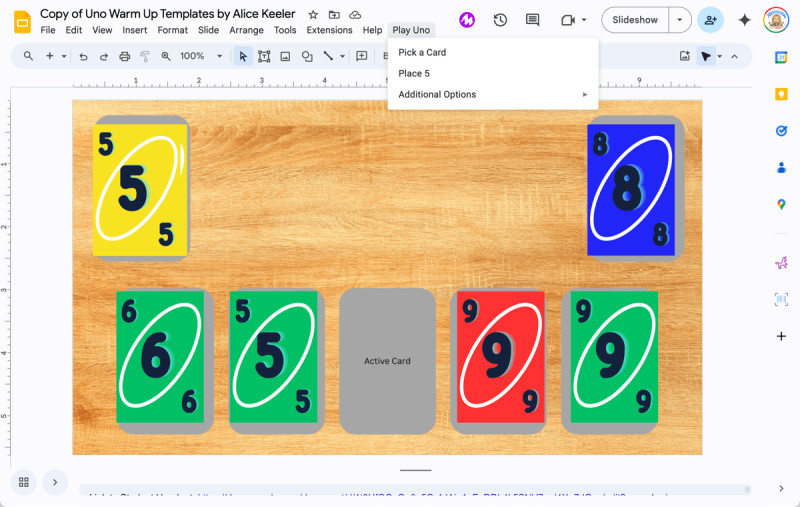
To be honest... I'm still trying to come up with some good game rules!! This was by request from a few people to make an Uno version game for a warm-up. I got the Google Slides to work (and got a little out of control with adding features but it is so fun!) It is similar to a Jeopardy themed game in that each card links to a unique slide that you can use to ask a question or do a task. See Video of Uno Game Add-on Check In - Say Hello!!The premium passcode is still 2024 Check In - Say Hello!! I love how many of you have been signing in and letting me know what you're working on. I'm still experimenting with seeing what AI can come up with when I give it some Teacher Tech prompts. I've been cranking them out, as you can see in this folder if you want to check out some ideas: Folder of Suggestions If I am a little slow to respond I'm putting some extra effort into the responses but it's coming!! Make Folders for Students Unofficial Add-onAs a premium member you have access to exclusive content. Try out this unofficial Add-on. It collects no user data. You can find more on the website at alicekeelermembership.com with the passcode of 2024 alicekeeler.com/makefolders By member request!
I have made a premium version of http://alicekeeler.com/makefolders The request was to be able to make folders in the folders. This creates a folder per student and then puts a sub folder for each column value into that folder. Links to all folders are put into the spreadsheet. Folders are shared with student if email is provided. 
Teacher TechOur focus is on not just using technology but leveraging it to transform and enhance the learning experience beyond the traditional means. Remember, going paperless isn't the goal; it's about making learning more engaging, accessible, and effective. Beyond Substitution in the SAMR ModelThe SAMR model (Substitution, Augmentation, Modification, Redefinition) helps us evaluate our use of technology in the classroom. While Substitution is a start, we aim for Modification and Redefinition to truly transform our teaching practices. Tip #1: Collaborative Learning Environments- Modification: Use Google Docs not just for typing but as a collaborative workspace. Encourage students to work on documents simultaneously, providing real-time feedback and collaboration.
- Redefinition: Leverage collaborative platforms for global classroom projects. Connect your students with peers around the world to collaborate on projects, fostering a global perspective.
Tip #2: Interactive Assessments- Modification: Move beyond multiple-choice quizzes. Use tools like Google Forms to create interactive assessments that include videos, images, and open-ended questions requiring higher-order thinking.
- Redefinition: Use platforms like Flipgrid for students to submit video responses and presentations. This not only assesses their understanding but also skills in communication and digital literacy.
Tip #3: Dynamic Feedback- Modification: Use commenting features in Google Classroom or Docs for timely, specific feedback. Highlight strengths and areas for improvement directly in their work. Utilize Google Forms' ability to aggregate responses into one location, enabling quicker review and analysis of student answers. This consolidation helps identify common misunderstandings or themes, guiding targeted instruction.
- Redefinition: Integrate peer review sessions using digital platforms, where students can anonymously provide constructive feedback to each other, fostering a community of learning and growth.
Tip #4: Gamify Learning- Modification: Incorporate educational games and simulations that align with your curriculum. Tools like Quizizz can make revision sessions more engaging.
- Redefinition: Have students create their own games or quizzes as a form of assessment. This not only tests their knowledge but also skills in creativity and technology.
Paperless is Not a PedagogyIncorporating technology means more than just eliminating paper. It's about creating more effective, engaging, and inclusive learning experiences. Every tech tool we use should have a clear purpose and benefit for the students' learning journey. Stay ConnectedWe're here to support each other in this journey of educational transformation. Share your success stories and challenges in incorporating technology in your teaching. Also.. I need some ideas for how to make rules for the Uno game!! Uno Game Suggestions Please!
| 