Hi , It's almost the end of the 🌛quarter and it's time⏲️ to submit grades. I asked on Twix/X," What research drives your late work policy?" Check out the results below. When you 🖊️sign in let me know what your thoughts about "late work" and grades. 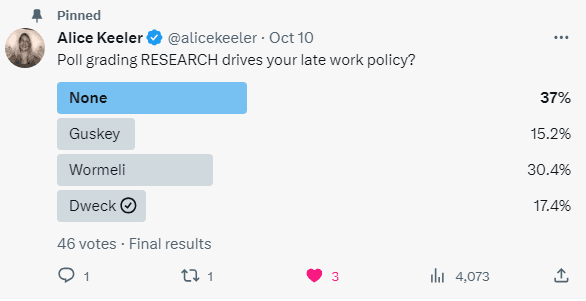
🎟 The passcode is hialice but you may still need alpaca for some premium addons.
PLEASE SIGN IN! I respond ☀️ What Is Up This Week-
🖊️SIGN IN with the passcode hialice
-
📅 Be added to the events calendar for the week. (do this every week!)
- 🔺 Premium Add-on:: Forms to Slides Forms to Slides Tutorial
4.💧 Drip Workshop-One Lesson Per Week (online course) 6 Ways for Students to Use Google Sheets 5..☑️Check alicekeelermembership.com with passcode hialice for resources & events. 6.⏺️ Webinar Recording: 5 Tips for Google Slides 7.⏺️ Webinar Recording with Alice:FAST-Create a Google Form 8.✅ Check out: Getting Started with FigJam Guide 🖥️Premium Events🟣
🏢Office Hours with Marcia MENTORS: Tuesday Oct 17 4-4:30pm PST Join with Google Meet 💻Webinar with Alice Keeler: GeoGebra: Illustrative Math Curriculum Video
 Customize 🎨 Your Google Form Customize 🎨 Your Google Form
🙂You can add your own 🖼️ image to the header of a Google Form! 🖱️Click on the painter pallet next to the Add-on 🧩 puzzle piece. 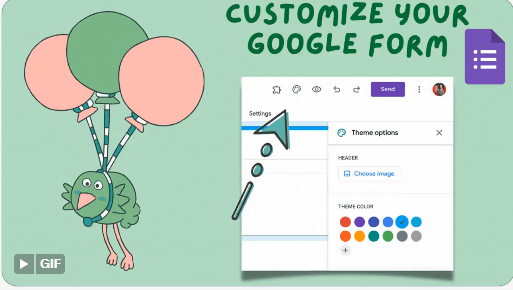
 How 🤔To Find Who Did Not Fill 📃Out The Form? How 🤔To Find Who Did Not Fill 📃Out The Form?
Install Missing From by Alice Keeler

➖Missing From Google Forms™The Missing From by Alice Keeler Add-on helps you to match up a list of email addresses you were expecting to fill out the Form with the email addresses that were submitted. This works quickly and easily to provide you a list of who did NOT fill out the Form. 🟩Privacy Permissions with Missing FromThe Missing From Add-on has zero access to your Google Forms or Google Drive data. Your email address is matched to confirm your subscription to Missing From. This is the only information that is known or used by the developer: AliceKeeler. 🖌️Create a Google Form™Obviously, if you want to know who did NOT fill out a Google Form you will need to have a Google Form. ➕Add a New Sheet🆘You will need a sheet in the Google Form responses spreadsheet that contains a list of expected email addresses. Missing From by Alice Keeler is a Google Sheets™ Add-on. 🎬Start by going to the Responses tab in your Google Form and clicking on the spreadsheet icon. You should be viewing the Google Sheets spreadsheet that collects Google Form responses. Add a new sheet or you can send a sheet that you have of participant email addresses to the Form Responses sheet. 
👉For an existing spreadsheet use the “Copy to” in the tab menu to send to “Existing spreadsheet.” 
🟦Column Header EmailYou MUST have column headers on your expected participant’s sheet. The header needs to contain the word email. No other headers should contain the word email. Missing From by Alice Keeler Finds email addresses that are missing from Google Forms by matching email addresses so it is important that you label which column has those email addresses. 🟥Form Collects EmailIt is very important that your Google Form is automatically collecting email addresses. To ensure unique values to match, email addresses are used as the key for who is missing from the Google Form. 🟨Matching Form TabMissing From by Alice Keeler does assume that you are using a Google Form and that your tab with the Form Responses says “Form.” You may have renamed the tab for Form Responses. At least temporarily please put “Form” as the first 4 characters on the tab name. 🟧Extensions MenuThe Add-on Missing From by Alice Keeler can be found in the Extensions menu after you have installed it. Be sure that you are looking at the pull participant list before running the Add-on. The Add-on will automatically detect which column has the word email in it and match it against column B (email addresses) in the Form tab. A new sheet will be added to your spreadsheet with the list of who did NOT fill out the Form. 🟪VLOOKUPIf you would like to know more than the email address of who did not fill out the Google Form, please use a vlookup on the participants email addresses to grab additional columns such as name.
| 