Hello ! Please sign in and say hello! The passcode is still 2024. I made a premium Add-on for you this week. Make a folder SUPER FAST!! Make a copy of the template, type or paste folder names into column A. Use the menu to create the folders. Go check your Google Drive. All the folders are created as sub folders. Get Premium Make Folders Fast Unofficial Add-on
This Week "Where In the World is Alice"This week I am going to the "Education in the Gemini Era" at the Google office in New York. Some of it is under NDA so I won't be able to report back all of it, but what we can talk about is that this year the buzzword is AI. Try Coding with Google GeminiSo let's use some AI... Go to http://gemini.google.com or chat.openai.com and use the free version (or better yet, the paid one if you have it). Put in a prompt:
Create an add-on for Google Docs using Google Apps Script that will create a folder in Google Drive with the same name as the Google Doc and make a copy of the Google Doc 10 times and each copy is saved in the folder and is numbered 1 to 10 with the original doc name appended.
Debug by Telling AII notice that Gemini returned a depreciated method and there was an error. Highlight the error and copy and paste it into Gemini to tell it try again. When I said that the method to move a file into a folder was depreciated, Gemini fixed it. I am going to stubbornly use the free version of Gemini... but to be honest, ChatGPT does this much better (for now.) Create a Google DocYou will need a new Google Doc. http://docs.new Make sure you give it a name and put something on the document. Use the Extensions MenuIn the Google Doc go to the Extensions menu and choose "Apps Script." 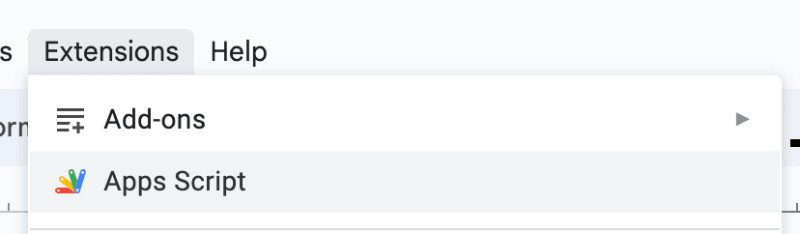
Paste the Gemini CodeFrom Gemini or ChatGPT copy the code and paste it into the script editor. (Delete the default function first). Save and RunClick the save icon and hit run. You will need to authorize the add-on. 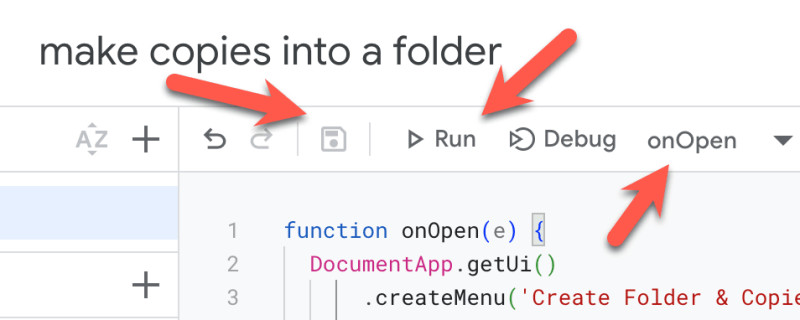
onOpen Creates a MenuProbably the function you ran was named "onOpen." This will create a menu in the Google Doc. Go back to the Google Doc (other tab that is not the script editor) and find the menu. 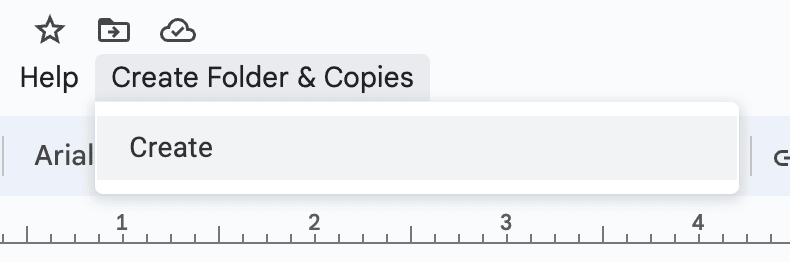
If you get an error... copy it and paste back into Gemini and keep telling it that it doesn't work. If it gives you a code snippet rather than the full function, reply to Gemini that you want the full function. Tip: Run From the Script EditorAfter replacing the code you can use the menu in the Google Doc to try again... but I would recommend you run the function from the script editor instead. Notice the drop down in the toolbar next to "Debug" that allows you to choose the function you want to run. Click on "Run" after selecting the function. 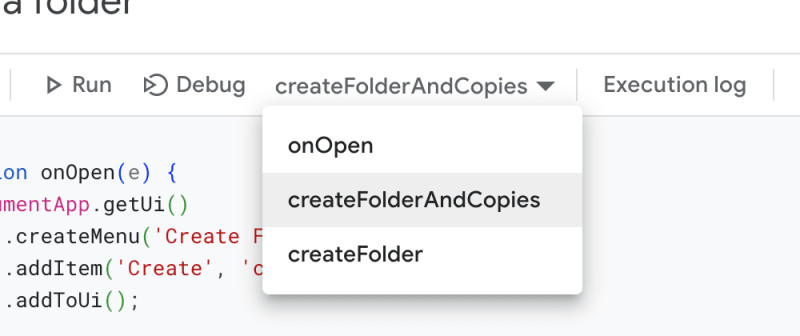
Keep pasting the errors back into Gemini. And tell it to "give me the full code" Try console.logIf you are having issues with the code, ask Gemini to add console.log to the code. 
Note: I put the original prompt into ChatGPT and the sample code worked the first time. How Did It Go? Tell me!
Try it and let me know!! | 