Hi , Happy 🇺🇸President's Day and week for some. My friend in 🌞CA gets the whole week off, which I think is great for students and staff. A chance to 🔋recharge. When you sign in let me know what you do to 🔋recharge yourself. 📘Consider joining the NEW DRIP workshop on Gamified Warmups and joining me next Thursday 2/29 for a ➗FREE OTIS presentation on Rethinking Order of Operations! Thank you for being a Premium Member! 🎟 The passcode is 2024PLEASE SIGN IN! I respond ☀️ What Is Up This Week-
🖊️SIGN IN with the passcode 2024
-
📅 Be added to the events calendar for the week. (do this every week!)
- 🔺 Premium Add-on: First Slide by Alice Keeler Push and Pull Slides.
4.💧🆕NEW Drip Workshop-One Lesson Per Week (online course) FREE for Premium Members. Sign up for Drip Workshop Here 
5..☑️Check alicekeelermembership.com with passcode 2024 for resources & events. 6.⏺️ Webinar Recording with Alice: Making A Google Site Make A Google Site Presentation 7.⏺️ Webinar Recording with Alice: Change the Background in Google Meet
8.✅ Check out: Totally Unscripted with Alice Keeler TU5.4 - Beyond Basic Bots: Building Intelligent Assistants with Google Chat and Vertex AI 🌟Premium Event This Week✴️ Office Hours with Marcia MENTORS: Monday Feb 26 4-4:30 PM PST Join with Google Meet
 Try This Trick: 👾Pixel Art Fill Multiple Cells Try This Trick: 👾Pixel Art Fill Multiple Cells
Install Pixel Art by Alice Keeler 🤖Pixel Art Fill Multiple CellsTo fill in a large number of cells in a spreadsheet the same color using pixel art you would need to type the same number over and over. 👉👉👉There is a better way!
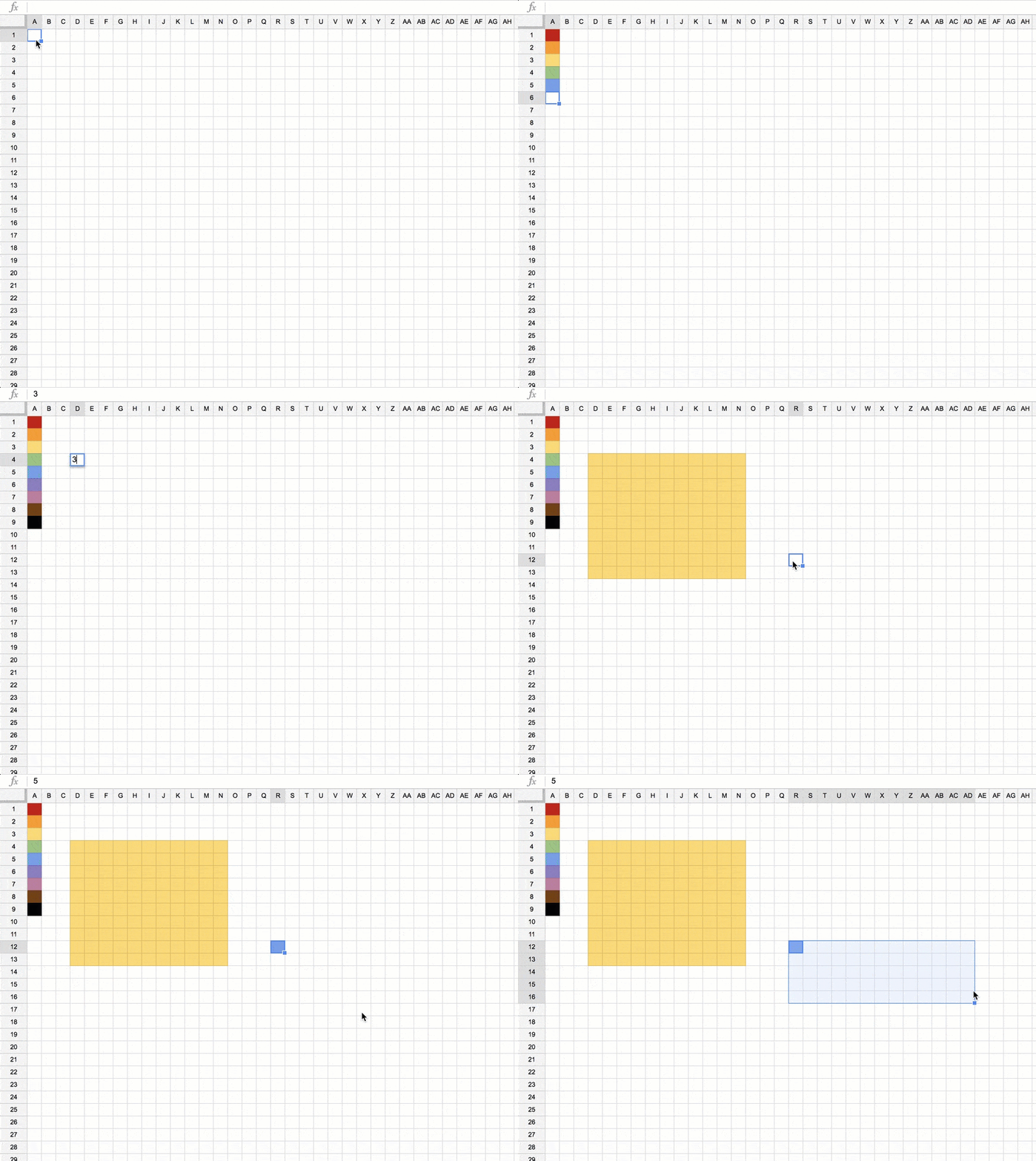
📙Shift KeyIn a cell type a 🔢number into the pixel art template. Single click back on that same cell and hold down on the Shift key. While holding down the Shift key, click on another cell. This will automatically select the range of cells in between the two cells. 🔼Control EnterWith the range selected hold down the Control key and press Enter. This will copy the value or formula in the upper left-hand corner to the entire range. In the case of pixel art it will place the number typed into all of the cells in the range, thus quickly painting an entire section of the spreadsheet.
 🆘Help Your Students Prepare to 🗣️Present 🆘Help Your Students Prepare to 🗣️Present
🟣I created “Speaker Notes by AliceKeeler,” an add-on for Google Slides designed to transform how students prepare to present. Through this 🔨tool, preparing and delivering presentations becomes an engaging and skill-building experience, vital for student growth. 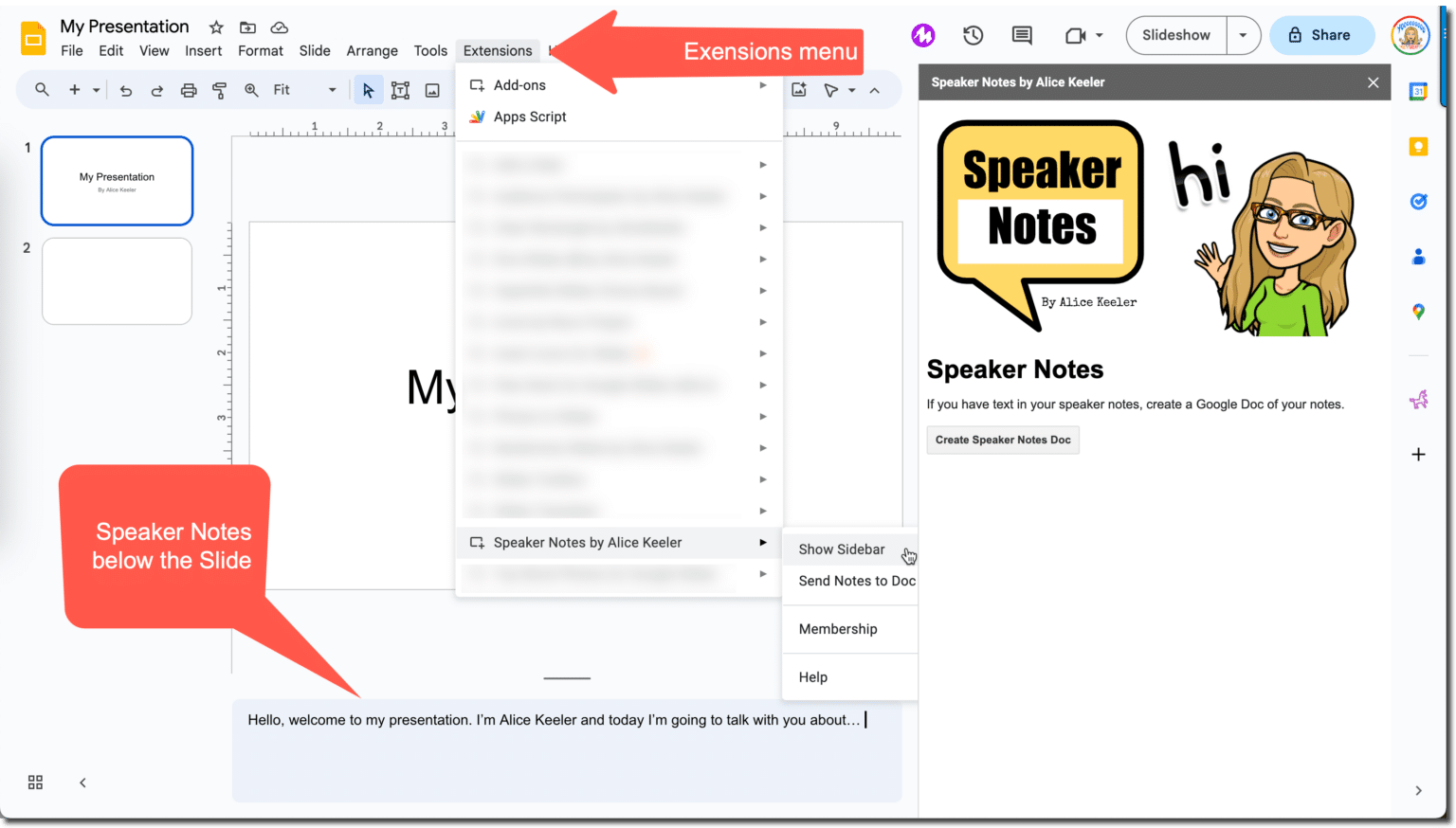
💬Students Prepare to PresentObviously students are born knowing how to present. This is a learned skill that requires practice and feedback. 🔴Simplifying the Process of ExpressionSpeaker notes are a crucial element in presentation preparation, offering a structured way for students to organize their thoughts and articulate them clearly. My add-on takes this a step further by seamlessly transferring these notes from Google Slides to a Google Doc. 🔵Making Practice More Accessible and EffectiveBy shifting speaker notes to a Google Doc, I aim to give students a more adaptable platform to practice and perfect their presentations. This flexibility is especially important in helping students to become more confident speakers; ensuring every student has the tools they need to prepare to present confidently and competently. 📙Using 🔈Speaker Notes by AliceKeelerSpeaker Notes by AliceKeeler collects NO user data! No PII. It is safe to use with your students. Starting with a Google Slides, students will utilize the area below each slide to plan out what they will say on the slide. When creating presentations I prefer to have little to no words. “You are your presentation.” You want to avoid having the audience read your slide and try to listen to you at the same time. 🧑🎓Students Prepare to Present with 🗣️Speaker NotesEspecially when students are preparing to present without being able to read the slide they need to have a lot of practice. ☑️Send to a Google Doc📃After installing “Speaker Notes by AliceKeeler” the Add-on will be available in the extensions menu. Students can easily use the Add-on to generate a Google Doc with the presentation outlined. ✴️Using the Google Doc, students can quickly read through or print what they want to talk about to prepare to present.
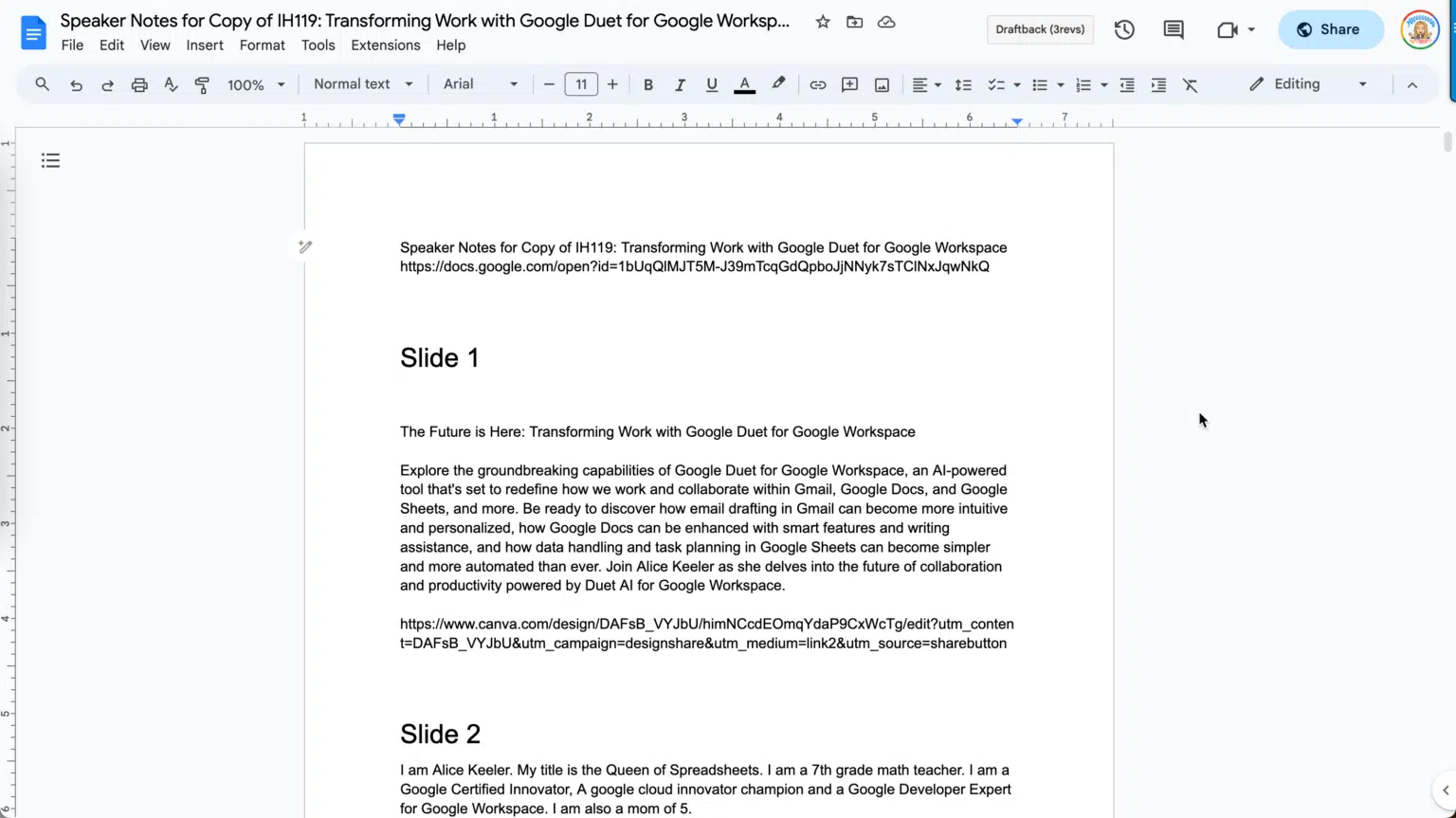
🗯️Provide Students FeedbackWhether you create the Google Doc of speaker notes from the presentation or students share their Google Doc with you, it is easier to provide students feedback. 📗Insert comments into the Google Doc to help students refine their ideas to effectively communicate their topic.
📓As a teacher you are not able to add comments on the speaker notes. You can only add comments to elements on the slide. By having the comments on a Google Doc you can highlight words or phrases and use Control Alt M to insert comments for the student.
⭐Premium Features in Speaker Notes by AliceKeelerWhen exporting to a Google Doc each slide number is added as a heading. This makes it clear what slide the speaker notes are for. 💟Slide Title Exported to Google Docs📄Instead of the slide number as the headings in the Google Doc, premium members are able to export the slide title to the Google Doc.
Recent Blog Posts - February 20, 2024: What Is Google Vertex AI?
- February 19, 2024: Reverse Sort and Wrap Google Forms Responses
- February 15, 2024: How to Create Digital Tape Diagrams
- February 8, 2024: 5 Hidden Features in Google Forms
- February 6, 2024: It's Time - Switch to Pageless in Google Docs
- January 30, 2024: Sheet Streamer - Copy to Other Sheets
- January 17, 2024: Your AI Rubric Stinks
- January 16, 2024: What Is Wrong with This AI Lesson Plan?
- January 15, 2024: Honoring Martin Luther King Jr.: The Journey Towards Equity in Education Continues
- January 11, 2024: Join Alice Keeler, Google Developer Expert, on the New Season of Totally Unscripted
| 